


Jersey Mike's
4.852.86K Reviews
App Specs
- Version
- 2.53.0
- Updated On
- License
- Free
- Downloads
- 5,000,000+
- Developer
- Jersey Mike's Subs
- Categories
- Food & Drink
- Platform
- Android, iOS
Screenshots
 Analysis by AppCompare
When I’m deciding what to eat during a busy day, the useful question is not just what sounds good; it’s whether I can get the order right without losing time to a long queue or a confusing checkout. Jersey Mike’s has a free Food & Drink app from Jersey Mike’s Subs, and its main job is to move that choice onto my phone so I can order ahead. I see it as a practical shortcut for people who already know they want a sub, rather than a broad restaurant-discovery tool.
When ordering ahead makes sense
A realistic use is a lunch break with a fixed end time. I can decide on a sandwich before leaving work, check the menu in the app, and submit the order before heading to a nearby Jersey Mike’s. That changes the shape of the errand: instead of arriving, reading the menu, and then waiting for the order to be prepared, I can use the trip to collect food I have already chosen. It is a small convenience, but it matters most when the lunch window is short or several people need to eat at roughly the same time.
The app is also useful when I’m ordering for someone else and want to avoid trying to remember several customizations at the counter. I can review each person’s choices on screen before placing the order, which gives me a chance to catch an obvious mistake while I still have the order in front of me. I would still ask anyone with a serious allergy or strict dietary requirement to verify the details directly with the restaurant; an app menu is not a substitute for checking how food is prepared.
Choosing, checking, and placing the order
The most dependable way to use an order-ahead app is to make decisions in a calm moment rather than while walking into a crowded shop. I’d browse the menu first, settle on the sandwich and any changes, then look over the complete order before paying. That final review is worth the extra few seconds: a modifier that sounds clear in my head can be easy to overlook when I am ordering quickly, and the checkout screen is the last useful point to catch it.
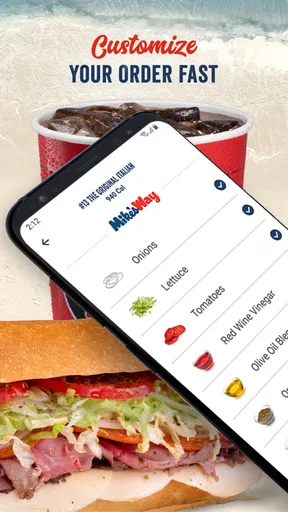
Customization can be especially handy for a regular order. If I know exactly how I like a sub, entering the changes myself is less awkward than calling them out over counter noise. It also makes the process more deliberate: I can distinguish between something I want removed and something I want added instead of relying on a rushed spoken exchange. The trade-off is that tapping through choices takes longer than ordering a familiar sandwich in person when the shop is quiet, so I would not open the app just for the sake of using it.
Before setting off, I would confirm the selected restaurant and pickup plan rather than assume the app has chosen the location I had in mind. That simple check is useful whenever there is more than one convenient branch or when I’m ordering from a place I do not visit often. Ordering ahead only saves time if I can reach the right shop and collect the right order; a wrong location turns convenience into an avoidable detour.
How the order meets the real world
There is a handoff between the phone and the restaurant, and that is where expectations need to stay realistic. The app can send an order ahead, but the restaurant still has to prepare it, and the trip to the counter remains part of the process. I treat the app as a way to reduce ordering friction, not as a promise that every visit will be instant. If I arrive earlier than expected, I may still need to wait; if I am running late, the food may be ready before I get there.
Worth Reading Before You Choose

Flipboard Shows What News Apps Must Do Beyond the Feed

Switching to Android Auto Means Rethinking Your Driving Routine

Google Calendar Makes a Crowded Week Easier to Manage

Ludo King Makes the Most of the Minutes Between Plans

Baby Panda World Brings Quick Play to Modern Phones, but Its Game Library Feels Busy

ESPN’s Live Game View Makes Following Close Games Easier
For a group lunch, the app can help me gather everyone’s preferences before submitting a single order, but I would take care to read back the basket with the group first. This is particularly useful when one person wants a plain sub and another wants several changes. The screen gives me a shared reference instead of a chain of verbal instructions. On the other hand, if the group is still undecided or people keep changing their minds, ordering together in person may be simpler than repeatedly editing a mobile order.
Delivery is a different kind of handoff from pickup: it asks me to wait for the food to reach me rather than plan a collection trip. That can suit an evening at home, while pickup may be easier when I am already near a restaurant. I would choose based on what I need that day, not assume one option is always better. The app’s appeal is strongest when I know where I want the meal and can make the choice ahead of time.
Where it fits among food-ordering options
Compared with calling a restaurant, ordering on a phone gives me a visual way to review the choices and enter customizations without trying to explain them over a noisy line. Compared with walking up to the counter, it can move some of the decision-making out of the queue. A general food-delivery app is more useful when I am comparing many restaurants or do not yet know what I want. Jersey Mike’s own app is the more focused choice when I have already settled on Jersey Mike’s and want to place that order directly.
That focus is both the strength and the limit. I would recommend it to someone who returns to Jersey Mike’s, likes to customize a familiar order, or wants to plan a pickup around work, errands, or a drive. I would skip it if I only eat there occasionally and find the counter quick enough, or if my main goal is to compare menus across different restaurants. An app can make a preferred choice easier; it cannot make the restaurant the right choice for every craving.
Small habits that make it more useful
My practical tip is to separate browsing from checkout. Looking at the menu while distracted, then tapping through payment in a hurry, is how a missed change or wrong pickup plan becomes likely. I’d build the order, pause to check the sandwich and modifications, confirm the restaurant, and only then complete the purchase. For several people, I’d check the order against each person’s request before submitting rather than trust my memory.
I would also keep expectations modest around timing. Ordering ahead can help me avoid spending the whole visit deciding and placing the order, but it does not remove preparation time, travel, or the possibility of a busy restaurant. If I have only a very narrow break, I would leave enough room to get to the shop and collect the food instead of planning around a perfect, immediate handoff. That is the difference between a useful shortcut and a source of stress.
The app is rated 4.8 on average from around 138,000 ratings, and it has more than 5 million installs. Those figures suggest that many people use it, but they do not tell me whether it fits an individual routine. I would judge it by a simpler test: does ordering ahead make a Jersey Mike’s meal easier to fit into my day? If I visit regularly, the answer is likely yes; if I rarely want a sub, the benefit will be smaller.
It is free, has an Everyone content rating, and is listed as version 2.44.1, with Android 8.0 as the minimum operating system. The release date is April 6, 2016. I mention these details because they help set expectations about access and compatibility, but the real decision is still about how often I would use it. The developer is Jersey Mike’s Subs, and the app stays focused on ordering from that restaurant rather than trying to serve as a general meal planner.
If you are wondering whether you need an account or which payment methods you can use, I would check the current screens during setup and checkout, since those details affect the actual order flow. I would not assume that a feature available in one visit or location works identically everywhere. What I can say is that the app’s core value is clear: it puts menu selection and ordering ahead of the restaurant visit, so I can arrive with the decision already made.
Getting Started with Jersey Mike's
First things first, downloading the app was a breeze. It’s available on both Android and iOS, so no one’s left out. Once installed, the sign-up process was straightforward. I appreciated the option to sign in with social media accounts, which saves time and keeps things simple.
User-Friendly Interface
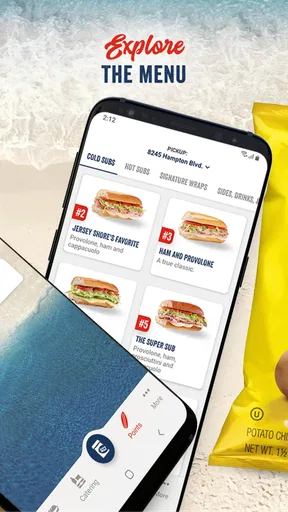
Now, let’s talk about the interface. The Jersey Mike's app sports a clean and intuitive design. Everything is laid out logically, making it easy to navigate. Whether you’re tech-savvy or not, you’ll find this app to be a walk in the park. The menu tabs are clear, and I was able to find what I needed without any hassle.
Order Customization
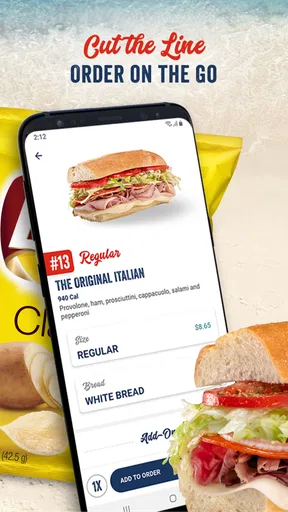
One of my favorite features is the ability to customize orders. As someone who loves a personalized sub, this was a game-changer. The app allows you to tweak your order to your liking, whether you want to add extra cheese or skip the onions. It’s all about making your meal exactly how you want it.
Rewards and Discounts
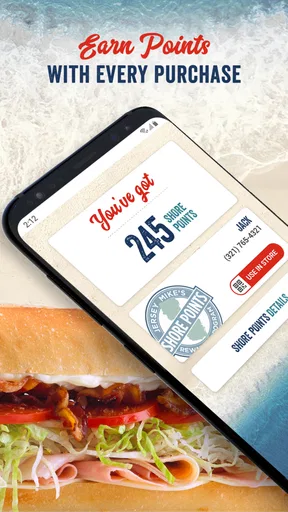
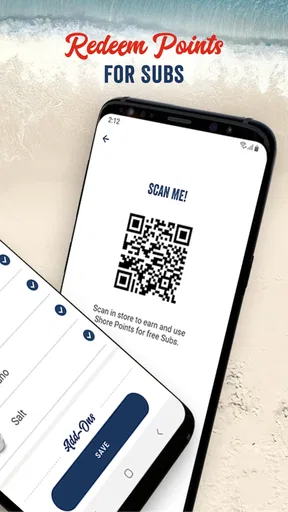
Let’s be real, who doesn’t love a good deal? The app offers a rewards program that’s pretty generous. Every time you place an order, you earn points that can be redeemed for freebies. Plus, the app frequently pushes notifications for discounts and special offers. It’s like having a little savings buddy right in your pocket.
Seamless Payment Options
Paying for your meal is just as easy as ordering it. The app supports various payment methods, including credit cards and digital wallets. This flexibility makes the checkout process quick and painless. I loved not having to dig through my bag for my wallet—just a few taps and my order was on its way.
Delivery and Pickup
Whether you’re in the mood to pick up your sub or have it delivered, the app covers all bases. It’s great for those days when you’re too cozy at home to venture out. Tracking your delivery in real-time is another feature that really enhances the user experience. You know exactly when your food will arrive, which is super handy.
Overall, the Jersey Mike's app is a solid choice for anyone who loves convenience and delicious subs. It’s simple, efficient, and packed with features that make ordering a joy rather than a chore. Next time you’re craving a tasty sub, give this app a whirl. Trust me, you won’t be disappointed.
Pros
- User-friendly interface for easy navigation.
- Quick order customization with detailed options.
- Loyalty program offers great rewards.
- Fast delivery and in-store pickup options.
- Nutritional info available for health-conscious users.
Cons
- Limited delivery areas may restrict access.
- Occasional app crashes reported by users.
- No offline access for menu browsing.
- Customization can be slightly overwhelming.
- Some users report slow customer support response.
FAQs for Jersey Mike's
What is Jersey Mike's app used for?
The Jersey Mike's app is designed to enhance your experience with the popular sub sandwich chain. It allows users to order and customize their favorite subs, find nearby locations, earn rewards through the Shore Points program, and receive exclusive offers. It's a convenient tool for Jersey Mike's enthusiasts who want to streamline their ordering process.
How does the rewards system work in the Jersey Mike's app?
The Jersey Mike's app features the Shore Points rewards program, where users can earn points for every purchase. Accumulated points can be redeemed for free subs and other rewards. To earn points, simply scan the app at the register or enter your receipt information. The app also notifies users of special promotions to earn extra points.
Can I customize my order through the Jersey Mike's app?
Yes, the Jersey Mike's app allows for full customization of your order. You can select your preferred bread, toppings, size, and style for each sub. The app also lets you save favorite orders for quick reordering in the future, making it easy to get exactly what you want each time.
Are there any exclusive offers available through the Jersey Mike's app?
The Jersey Mike's app frequently features exclusive offers and discounts available only to app users. These can include special promotions, birthday rewards, and early access to new menu items. Enabling notifications ensures you won't miss out on any deals tailored specifically for app users.
Is the Jersey Mike's app available for both Android and iOS devices?
Yes, the Jersey Mike's app is available for download on both Android and iOS devices. Users can find it in the Google Play Store for Android devices and the Apple App Store for iOS devices. The app is regularly updated to fix bugs and introduce new features, ensuring a smooth user experience.


